
① Add a new transaction and fill in its details.
Electronic signatures work for all types of transactions on Equify.
② At the Documents step, choose the document(s) to send for signature.

You can identify this/these documents by the template label displayed to the right of them.

③ At the Signature step, check that the signature tags have been correctly detected.

To have a document signed, you must add signature smartfield to it.
🧠 Need help preparing a document for signing with signature tags?
④ If you have a consent protocol, activate it by clicking the relevant button, then type the text that must be approved by the Holder.
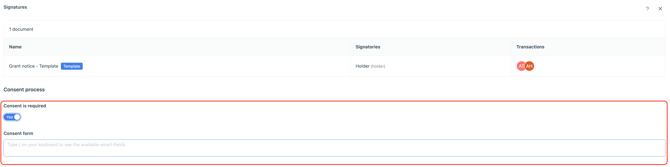
You can use our mail merge feature to customise your consent protocol.
-
The supported smartfields are:
-
account name -
-
security name
-
quantity
-
quantity in words
-
price
-
price in words
The consent protocol is only available for grant and subscription transactions.
⚠️ The consent protocol does not appear on the documents, but you can still find it in the signature evidence folder, which you can download from your library.
⑤ If the document includes a representative’s signature smartfield
Select the signatory from the list of administrators on your account and confirm their contact details.

⑥ Check the signatories’ contact details before confirming.
Email addresses and phone numbers are mandatory, as they are used as part of the electronic signature process.
💡 It is possible to disable signature validation. To do so, simply contact our support team at: support@equify.eu
⑦ Once the documents have been sent, you can find them in the library.
The documents are available in your library, under the Pending signatures tab.
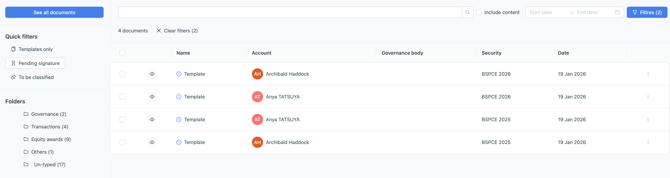
The documents will show as signature validated once all signatories have signed the document.

⚠️ Each procedure is valid for 6 months. If a procedure expires, our team can exceptionally reactivate it for you.